State Fees Increase: What You Need to Know

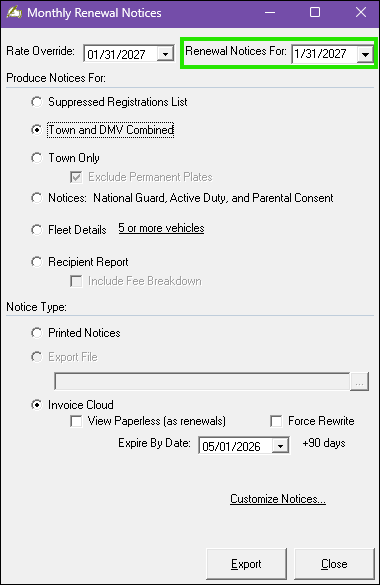
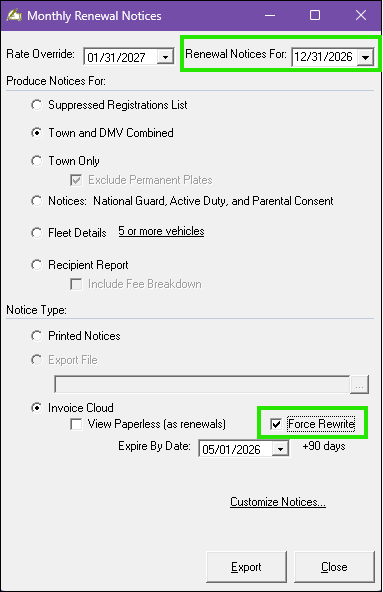
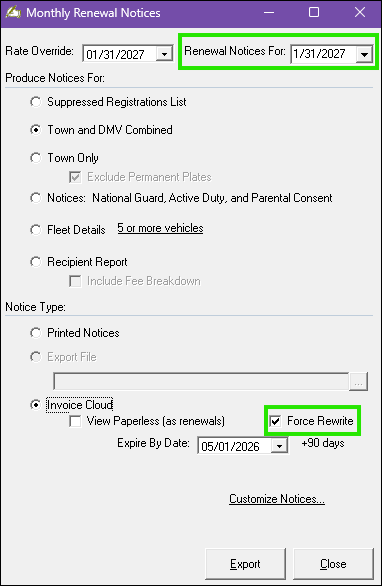
As you are well aware by now, beginning January 1, 2026, the State is increasing their portion of vehicle registration fees. To ensure a smooth transition, please review the important information/dates and follow the specific instructions outlined below.

Continue reading
Posted in Clerk/MV Software | Tagged , | Leave a comment

Online/Lockbox Batch Errors: What They Mean and How to Address Them

When processing your online/lockbox batch(es) through Avitar Clerk, there are several situations in which a transaction may fail during the validation process. If a transaction fails validation, it will be marked as ERROR, and you won’t be able to continue until the issue is addressed. But, how do you address the issue?

Begin by reviewing the error detail(s)—click the Edit box to the right of the transaction. After examining the issue, determine whether it can be corrected. Then, update the status to one of the following options: OTC, IGNORED, or CREDIT.

Continue reading
Posted in Clerk/MV Software | Tagged , , , | Leave a comment

Clerk Post-It Notes

In a busy municipal office, it’s easy for important tasks, reminders, and follow-ups to slip through the cracks—especially when managing vehicles, owners, payments, and pet records. The Post-It feature in the Avitar Clerk system is designed to help you stay organized and on track.

Whether you need to flag a license plate, VIN, or owner with a note, alert staff to a returned payment deadline, or set a reminder for an upcoming rabies vaccination expiration, Post-Its offer a simple yet powerful solution. Unlike the basic Notes field, Post-Its can be categorized, stacked, and configured to trigger alerts based on specific dates or criteria.

For additional insights into this feature, select each of the following links:

We recommend bookmarking our online documentation page and reviewing it periodically, as it is regularly updated with the latest information.

Posted in Clerk/MV Software | Tagged , | Leave a comment

2025 MS-1 Report Update — Take Two

Originally we published a blog post indicating that while there were no changes for 2025 to the MS-1 Report file specification, we were nonetheless waiting to receive a list of changes to utility company names for 2025. Then we received the list so we sent those utility company name changes out to all of you in a subsequent blog post. There was just one slight problem — the list we received was incorrect. Fortunately, this was noticed/questioned by a thorough reader who contacted DRA (thanks, Tom!) and DRA notified us on Tuesday that they, rather than a vendor, would provide us with the correct list.

See below for the correct list and a reminder of what this means for you with respect to generating your 2025 MS-1 Report and submitting it to the DRA:

Continue reading
Posted in Assessing Software | Tagged | Leave a comment

Lien Deadline is Right Around the Corner

The deadline for liening your prior year invoices is quickly approaching. If you’ve already completed your lien process—congratulations!

If you’re unsure whether any accounts need to be liened, go to Reports | Collection YTD. Review for any outstanding balances on 2024 invoices, including property, timber, current use, gravel, or water/sewer. If any balances remain, be sure to create lien notices before the end of August.

For a complete overview of the process, refer to our post from July 30, 2024 on the same topic: Lien Execution Deadline Approaching. It includes RSAs, important deadlines, and step-by-step instructions to guide you through the process.

Posted in Tax Collect Software | Tagged | Leave a comment

2025 MS-1 Report Update

As we noted recently, there are no changes for 2025 to the MS-1 Report file specification. See below for what this means for you with respect to generating your 2025 MS-1 Report and submitting it to the DRA:

Continue reading
Posted in Assessing Software | Tagged | Leave a comment

2025 MS-1 Report and Mosaic Exports

That time of year again, and as in recent years the DRA has made no changes to the MS-1 Report file specification for 2025. That said, we are still waiting to hear back from the folks in charge whether there will be any changes to the list of approved utility companies. Additionally, there have been a few changes to the format and process for submitting your Mosaic Parcel and Sales export files. So at the risk of sounding slightly <like a broken record> repetitive, here’s what this all means for you going forward:

Continue reading
Posted in Assessing Software | Tagged , | Leave a comment

Changes to Civil Forfeiture Law re: Cost of Service (COS) Fee

A recent amendment to RSA 466:14 updates the Cost of Service (COS) for the civil forfeiture of unlicensed dogs.

Service Fee Update
The $7 flat fee for serving a civil forfeiture notice has been changed. The cost of service—whether delivered by certified mail, in hand, or left at the residence—may now match the current USPS certified mail rate with return receipt.

Municipal Cost Recovery
Municipalities may recover the service cost in addition to the forfeiture amount, helping offset enforcement expenses.

Update the Fee in Avitar Clerk
To update the cost in Avitar:

  • Go to Utilities > System Administration > Dog Licensing > Fees
  • Select Dog Civil Forfeiture – Cost of Service
  • Click Modify, enter the new amount, and click Save

As always, we recommend bookmarking our online documentation page and visiting it regularly, as we continue to make updates.

Posted in Clerk MAAP Software | Tagged , , | Leave a comment

Commercial (COMM) Plates

On Sunday, June 23, 2025, the New Hampshire Department of Motor Vehicles (DMV) introduced a new hard-stop in the vehicle registration process for Commercial (COMM) plates. This change was implemented because the State is trying to clean up thousands of COMM plates that have been issued incorrectly to vehicles with a GVW of under 26,000 lbs., which does not meet legal requirements for issuance.

When attempting to process a registration (new, renewal, or transfer) of COMM plates, if the vehicle’s GVW is under 26,000 lbs., a version of the following message from MAAP will appear:

At this point, you have two options:

  1. Process only the Town portion of the transaction and direct your customer to the State to complete the registration.
  2. Switch the plate to a Passenger (PASS) plate (at the customer’s expense) to complete both the Town and State portions.

As outlined in the MA Manual (page 44), in accordance with RSA 259:12-e:

If you have any additional questions about the issuance of commercial plates, please contact the MA HelpDesk.

Posted in Clerk MAAP Software | Leave a comment

It’s Civil Forfeiture Season for Dogs

That time of year is here again—when dog owners who haven’t renewed or licensed their pups from last year may face the Civil Forfeiture process.

The RSAs lay out clear guidelines on when each step of the Civil Forfeiture process must be completed. Below is a helpful timeline to keep you on track, along with links to instructions for creating the Civil Forfeiture letters and assigning fees to the appropriate dogs.

  • June 1st to June 20th: Create your unlicensed dog warrant and list for all dogs that have not been renewed and/or have never been licensed. (Utilities | Unlicensed Dog Warrant). This list and warrant need to be given to your governing body (selectmen/alderman/councilors) for their signatures to authorize the issuance of the civil forfeiture letters and corresponding fees. (RSA 466:14 Warrants; Proceedings).
  • June 21st to July 11th: Your governing body will issue the warrant to “a local official authorized to issue a civil forfeiture for each unlicensed dog.” This could be your local police department, dog officer, or even you, if you send the letters by certified mail. (Utilities | Dog Civil Forfeitures). Note, if you use Invoice Cloud to process online dog payments, you need to update your dog invoices onlineat least monthly.
  • By August 31st: Your local law enforcement officer, or whomever was named on the unlicensed dog warrant, must return a list showing the owners who paid and licensed their dogs, the dogs that were seized, and the owners who have not licensed their dogs, and may need to receive a summons to your district court. (RSA 466:16 Returns).

It is extremely important for you to be uploading your dogs to Invoice Cloud (if you have this functionality), on the first of each month, to include the $1.00/month late fee. For information on how to upload dog invoices to Invoice Cloud, and the frequency in which you should do so, select Dog Invoice Upload.

Posted in Clerk/MV Software | Tagged , , | Leave a comment