
It has been brought to our attention that when processing new title(s)/registration(s) for vehicles with a Gross Vehicle Weight (GVW) over 26,000 lbs., the Town-only transactions will not make it to MAAP if you do not answer the prompts correctly. This short blog post will help you take the correct course of action during the processing of these transactions.
SCENARIO: After entering information for a vehicle with a GVW that is over 26,000 lbs., and has never been registered in NH, the following MAAP Error dialog box pops up:
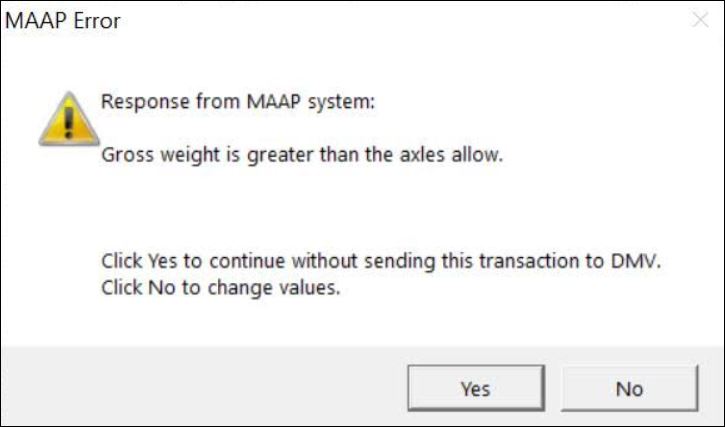
The reason you have received this error message is because the GVW per axle entered is legally incompatible for New Hampshire roadways. If you choose YES this transaction will be processed as OFFLINE, not going to MAAP. And, since the transaction will not be sent to MAAP, this will cause a longer wait time for your customer when they go to the State to complete, as the clerk there will need to re-enter all of the information you already entered.
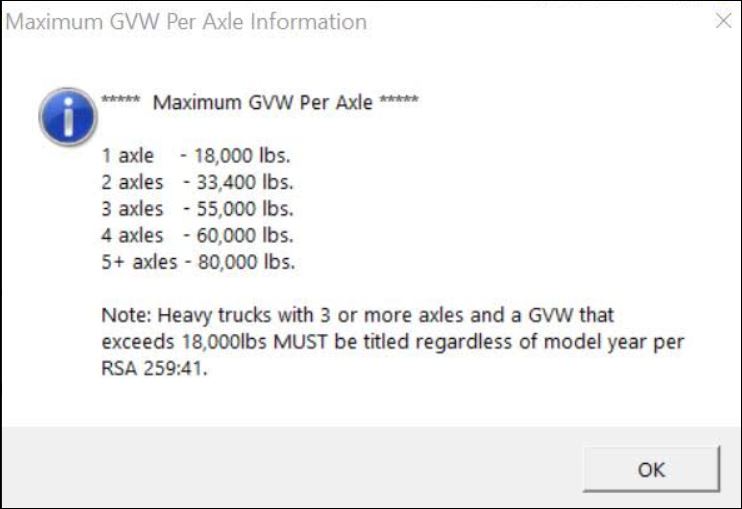
In these cases you need to select NO and change the value of the GVW per the number of axles that are on your customer’s vehicle. To find out what GVW you should be using, you can view the Maximum GVW Per Axle Informational Pop-up Window by clicking on Gross Wt or Axles from the registration screen. The dialog box below displays the Maximum GVW Per Axle for the State of New Hampshire roadways:
NOTE: If you have any questions regarding weight and axles, you will need to contact the MA Helpdesk.
Please continue to utilize our online documentation as we are frequently updating.
 Avitar Associates