Changes to Civil Forfeiture Law re: Cost of Service (COS) Fee

A recent amendment to RSA 466:14 updates the Cost of Service (COS) for the civil forfeiture of unlicensed dogs.

Service Fee Update
The $7 flat fee for serving a civil forfeiture notice has been changed. The cost of service—whether delivered by certified mail, in hand, or left at the residence—may now match the current USPS certified mail rate with return receipt.

Municipal Cost Recovery
Municipalities may recover the service cost in addition to the forfeiture amount, helping offset enforcement expenses.

Update the Fee in Avitar Clerk
To update the cost in Avitar:

  • Go to Utilities > System Administration > Dog Licensing > Fees
  • Select Dog Civil Forfeiture – Cost of Service
  • Click Modify, enter the new amount, and click Save

As always, we recommend bookmarking our online documentation page and visiting it regularly, as we continue to make updates.

Posted in Clerk MAAP Software | Tagged , , | Leave a comment

Commercial (COMM) Plates

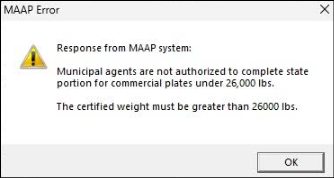
On Sunday, June 23, 2025, the New Hampshire Department of Motor Vehicles (DMV) introduced a new hard-stop in the vehicle registration process for Commercial (COMM) plates. This change was implemented because the State is trying to clean up thousands of COMM plates that have been issued incorrectly to vehicles with a GVW of under 26,000 lbs., which does not meet legal requirements for issuance.

When attempting to process a registration (new, renewal, or transfer) of COMM plates, if the vehicle’s GVW is under 26,000 lbs., a version of the following message from MAAP will appear:

At this point, you have two options:

  1. Process only the Town portion of the transaction and direct your customer to the State to complete the registration.
  2. Switch the plate to a Passenger (PASS) plate (at the customer’s expense) to complete both the Town and State portions.

As outlined in the MA Manual (page 44), in accordance with RSA 259:12-e:

If you have any additional questions about the issuance of commercial plates, please contact the MA HelpDesk.

Posted in Clerk MAAP Software | Leave a comment

It’s Civil Forfeiture Season for Dogs

That time of year is here again—when dog owners who haven’t renewed or licensed their pups from last year may face the Civil Forfeiture process.

The RSAs lay out clear guidelines on when each step of the Civil Forfeiture process must be completed. Below is a helpful timeline to keep you on track, along with links to instructions for creating the Civil Forfeiture letters and assigning fees to the appropriate dogs.

  • June 1st to June 20th: Create your unlicensed dog warrant and list for all dogs that have not been renewed and/or have never been licensed. (Utilities | Unlicensed Dog Warrant). This list and warrant need to be given to your governing body (selectmen/alderman/councilors) for their signatures to authorize the issuance of the civil forfeiture letters and corresponding fees. (RSA 466:14 Warrants; Proceedings).
  • June 21st to July 11th: Your governing body will issue the warrant to “a local official authorized to issue a civil forfeiture for each unlicensed dog.” This could be your local police department, dog officer, or even you, if you send the letters by certified mail. (Utilities | Dog Civil Forfeitures). Note, if you use Invoice Cloud to process online dog payments, you need to update your dog invoices onlineat least monthly.
  • By August 31st: Your local law enforcement officer, or whomever was named on the unlicensed dog warrant, must return a list showing the owners who paid and licensed their dogs, the dogs that were seized, and the owners who have not licensed their dogs, and may need to receive a summons to your district court. (RSA 466:16 Returns).

It is extremely important for you to be uploading your dogs to Invoice Cloud (if you have this functionality), on the first of each month, to include the $1.00/month late fee. For information on how to upload dog invoices to Invoice Cloud, and the frequency in which you should do so, select Dog Invoice Upload.

Posted in Clerk/MV Software | Tagged , , | Leave a comment

Reminder: Fiscal Period Close for Those With a July 1st Fiscal Year

Keep in mind that the Avitar Tax Collect system has a strict fiscal year-end close. This means no transactions can be processed in the new fiscal year until the previous one is officially closed. As we approach the end of June, we recommend that users with a June 30 fiscal year-end review the resources linked below for important information on how to prepare and what to expect.

Although some of these resources are from previous years, the process information remains relevant. When using our online documentation, blog posts, and FAQs to support your June 30th year-end process, be sure to adjust the fiscal year dates: replacing January 1-December 31 with July 1-June 30.

As always, we recommend bookmarking our online documentation page and visiting it regularly, as we continuously make updates.

Note: Those of you with a January 1st fiscal year do not need to do anything different at this time.

Posted in Tax Collect Software | Tagged , , | Leave a comment

Online Workshop – 2025 Dog Civil Forfeitures

We have scheduled an online workshop to go over the Dog Civil Forfeiture process. This session is open to all clerks, whether you are new to the position, new to the Avitar Clerk system, or just need a refresher.

Continue reading
Posted in Clerk/MV Software | Tagged , , | Leave a comment

2025 Tax Map Updates Reminder

With summer fast approaching, don’t let tax mapping updates fall off your radar. Mapping updates are processed in the order in which they are received, so submitting your materials promptly will help ensure timely completion and return of your updated maps.

Continue reading
Posted in Mapping | Leave a comment

Online Workshop – 2025 New Clerk Training (Motor Vehicle Only)

We have scheduled an online workshop for all our new clerks. This session is open to new clerks, whether you are new to the position, new to the Avitar Clerk system, or just need a refresher.

Continue reading
Posted in Clerk/MV Software | Tagged | Leave a comment

First Issue Tax Warrant

Soon you will receive your first Property Tax Warrant of 2025 (2025P01). Whether you’re new to the role or a seasoned Collector, taking the time to review the Warrant Process in advance will help ensure a smoother experience.

We’ve put together straightforward, step-by-step instructions for each part of the Warrant Process: Import Warrant, Assign Credits to Warrant, and Print Tax Bills. At the bottom of each page, you’ll find a link that takes you to the next step in the process. For instance, at the end of the Import Warrant page, there’s a link labeled Assign Credits to Warrant, which takes you directly to that topic—and conveniently, the next step.

At some point between your first and second issue billings, you’ll likely encounter an abatement. For guidance on handling abatements related to first issue tax bills, please refer to Abatements on First Issue Tax Bills.

As always, please check our online documentation as well as our FAQs page frequently as we are updating regularly.

Posted in Tax Collect Software | Tagged , | Leave a comment

Online Workshop – 2025 New Clerk Training

We have scheduled an online workshop for all our new clerks. This session is open to new clerks, whether you are new to the position, new to the Avitar Clerk system, or just need a refresher.

Continue reading
Posted in Clerk/MV Software | Tagged | Leave a comment

Balancing Over-the-Counter Credit Cards in Clerk

Many of our towns accept over-the-counter credit cards as a payment type for transactions processed through Avitar Clerk. Some of these towns prefer to separate their deposits into cash and check versus credit card payments. Did you know there is a very simple way to do this?

Continue reading
Posted in Clerk/MV Software | Tagged , | Leave a comment